Choosing Commercial Shelf Edge LCD Series (23.1″, 35″, 47.1″) for Enterprise Integration: Display Integration Guide for Equipment Manufacturers
If you build shelving fixtures, checkout units, refrigerated cabinets or complete store-fit-out systems, the shelf edge is the one surface every shopper looks at and the one surface most display suppliers get wrong. A bar-format screen that fights the fixture profile, needs a bespoke bracket for every gondola run, or cannot be driven from the customer's pricing backend turns a good specification into a field-service problem. ZCDISPLAY's commercial shelf edge LCD series is specified around those three constraints, with three panel classes — 23.1″, 35″ and 47.1″ — that share one mechanical interface, one content platform and one set of integration hooks.
This guide is written for the engineering and product teams who buy display hardware as a component: what each size is actually for, how the series mounts to your fixture, what you need from the software side before a rollout, and which details to confirm with the factory before signing off a build.
Why Equipment Manufacturers Standardise on a Shelf Edge LCD Series Instead of a Single Screen
A single display size rarely survives contact with a real retail estate. A grocery chain has 600 mm runs in dry aisles, longer runs in the centre-store fixtures, and still longer spans across hypermarket gondolas and high-value categories such as spirits, cosmetics or fresh service counters. Buying three unrelated screens to cover that spread means three bracket families, three power strategies, three content templates and — most expensively for a manufacturer — three separate firmware and support paths for the rest of the product's life.
The Commercial Shelf Edge LCD Series (23.1″, 35″, 47.1″) for Enterprise Integration is built the other way round: all three sizes share the same CMS platform, the same APIs and the same mounting system, so a mixed deployment is managed as one device class rather than three. For an equipment manufacturer that means one fixture design can be offered with any of the three lengths, and one integration effort covers the whole range. The same page lists all three sizes as in stock, which matters when you are quoting a rollout against a fixed opening date.
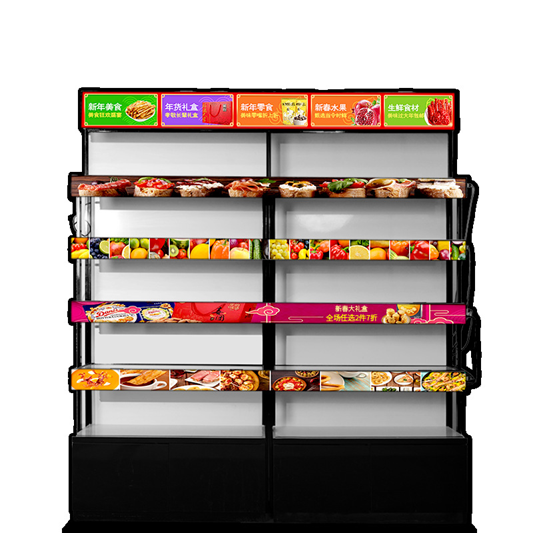
Shelf-edge LCD bars running along standard gondola shelving, replacing printed price labels.
Reading the Three Sizes: What Each Length Is Designed to Do
The series is organised around shelf run length rather than diagonal alone. The table below reproduces the size structure documented for the series; the panel figures for each individual model are on its own product page and should be taken from there when you write a datasheet.
| Series position | Panel class | Approximate run length | Where it normally goes |
|---|---|---|---|
| SE-23.1 | 23.1″ ultra-wide | ~600 mm | Standard grocery aisles, single-bay fixtures, checkout and counter units |
| SE-35 | 35″ ultra-wide | ~900 mm | Premium shelving, promotional bays, feature fixtures |
| SE-47.1 | 47.1″ ultra-wide | ~1200 mm | Hypermarket gondolas, high-value categories, end-cap and cross-aisle runs |
Two mechanical points matter more to a fixture designer than the diagonal. First, these are stretched bar panels, not cropped 16:9 screens: the active area is very wide and only a few centimetres tall, so content layout, pixel budget and legibility distance behave differently from an ordinary monitor. Second, the series documentation describes the larger sizes as scaling brightness and resolution proportionally while remaining pin-compatible with the base model — which is what lets you keep one power and data harness design across the range instead of re-engineering the loom for each length.
For reference, the 23.1″ base model is documented in the series material as an ultra-wide bar panel with a 50,000-hour rated lifespan under continuous operation, anti-glare coating, and DC 12 V power at under 25 W. The same series page lists HDMI, USB, LAN and WiFi interfaces plus RS232 daisy-chain, Android with a CMS player or a monitor-only configuration, and universal shelf brackets with tool-free installation. Treat those as the engineering starting point for your own specification sheet, then confirm each figure against the model page you are actually ordering: the individual model pages document different resolutions and brightness values from the series overview, so never carry a series-level number into a fixture datasheet without checking it.
Mechanical Integration: Brackets, Edge Thickness and Daisy-Chain Wiring
This is where most shelf-edge projects fail or succeed, and it is the part an equipment manufacturer controls. The series is documented as fitting shelving edges in the 5–40 mm thickness range using universal brackets that install without tools — a direct benefit if your installers are working in-store, out of hours, with a small crew and no workshop time on site.
Before you lock a fixture design, run these checks against the factory's mounting drawings:
- Edge profile, not just thickness. The stated range covers flat shelf edges; if your fixtures use a rounded lip, a double-edge rail or a plastic label strip carrier, ask for the bracket drawing before quoting.
- Depth and cable routing. Bar displays in this format sit proud of the shelf edge. Decide early whether the harness runs behind the shelf channel, under a trunking strip, or externally — external cabling is what customers complain about at handover.
- Daisy-chain topology. The series supports daisy-chained power and data through RS232. Plan how many bars sit on one chain, where the injectors sit, and how a failed unit is isolated without draining the whole run.
- Mixed lengths in one fixture family. Because the sizes share a mounting system, you can offer one fixture line with 600 mm, 900 mm and 1200 mm options. Confirm the bracket SKU for each length rather than assuming one part number covers all three.
If your product is a cabinet, vending unit or self-service fixture rather than shelving, the same bar-format panels are also supplied as standalone ultra-wide stretched LCD displays for embedded integration, which is often the cleaner route when there is no shelf edge to clip onto.
Software and Data Integration: What You Agree Before the First Pilot
A digital price bar is only worth buying if it is fed from the customer's pricing system. The series documentation describes pre-built APIs covering price synchronisation, content scheduling and device monitoring, compatibility with mainstream CMS platforms and custom ERP middleware, and OTA firmware updates so a fleet behaves identically across sites. That is the part of the specification your end customer's IT department will scrutinise, so settle it before the pilot, not after.
Concretely, an equipment manufacturer selling into retail chains should confirm four items in writing:
- Who owns the CMS. The series is documented as supporting a supplied platform for larger deployments or a bring-your-own-CMS model. If your customer already runs a signage or electronic shelf label backend, decide which system is authoritative and who maintains the mapping between SKU data and screen content.
- The API surface you will actually call. Price sync, scheduling and device monitoring are separate endpoints in practice; get the interface documentation for each and test them against a sample unit before you publish an integration claim in your own catalogue.
- Fleet operations at scale. The series is described as manageable from a single dashboard across large device counts, with mixed sizes handled by one platform. Verify the monitoring view shows firmware version and health per device — that is what your field team needs on a Saturday morning.
- Firmware consistency. OTA updates keep behaviour uniform, but you should still define a staged rollout: pilot devices first, then the estate. Ask how a rollback is handled if an update misbehaves.
Buying From the Factory: Customisation, Quality Control and Support
ZCDISPLAY supplies this category as factory-direct OEM and ODM work rather than off-the-shelf retail stock, which suits manufacturers who need the hardware to disappear into their own product. The engineering support covers customisation from prototype through production, quality control, compliance support and long-term technical assistance — see the OEM / ODM pages for how that engagement is structured, and the quality control and certification pages for inspection and documentation scope.
For a component that will ship inside your fixtures, the useful customisation conversations are usually: housing colour and logo treatment to match your fixture range, pre-loaded applications so the unit boots straight into your content player, connector and cable lengths matched to your harness, and region-appropriate power supply. Warranty length and support terms vary by programme, so confirm them per project rather than assuming catalogue defaults.
If you are specifying for a single store trial instead of embedding the hardware in your own product line, the individual model pages give you the standalone configurations to evaluate: the 23.1 Inch Shelf Edge Android Screen, the 35 Inch Commercial Shelf Edge Android Screen and the 47.1 Inch Commercial Shelf-edge Android Screen. For fixture-side integration work more broadly, the custom display projects page describes how bespoke formats are handled.
A Short Specification Checklist Before You Commit a Build
- Shelf edge thickness and profile measured on your own fixture, matched to the bracket drawing.
- One panel size confirmed per fixture variant, with resolution and brightness copied from that model's page.
- Power budget per chain and per fixture, checked against the documented DC 12 V consumption.
- API endpoints for price sync, scheduling and monitoring tested on a sample unit.
- CMS ownership agreed with the end customer, including SKU-to-content mapping responsibility.
- Spare-unit strategy defined: how many bars to hold per site, and the replacement path agreed with the factory before handover.
- Lead time and production slot confirmed in writing for every size you intend to offer.
Standardising on one shelf edge LCD series with three panel classes lets an equipment manufacturer offer a complete digital shelf-edge option without taking on three separate hardware programmes. The mechanical interface, the wiring strategy and the software integration are decided once and reused across 600 mm, 900 mm and 1200 mm runs.
Send us your fixture drawings, shelf edge profile and target panel lengths, and our engineering team will confirm bracket fit, power topology and the API set for your deployment — whether you are integrating the series into your own product line or specifying a store pilot.
Request a series quote