How to Source 65 Inch Commercial Windows Infrared Touchscreen Kiosk: How to Develop a Purchasing Checklist
A 65-inch Windows infrared touchscreen kiosk is one of the heaviest line items in an interactive signage project - heavy to ship, heavy to install, and unforgiving when the specification is wrong. Before you send a request for quotation, build a purchasing checklist that locks down the screen format, touch technology, computing platform, enclosure, peripherals and after-sales terms. The checklist below follows the way a factory-direct commercial display supplier actually reads an inquiry, so what you send comes back comparable across vendors instead of three different machines quoted on three different assumptions.
Why the 65-inch Class Behaves Differently in a Procurement
In our kiosk range, the 65-inch freestanding models stand close to two metres tall and need two people to move. That single fact changes several line items on your purchase order: freight moves from courier to sea or air cargo, the installation crew needs a levelling plan and an anchoring decision, and a replacement unit can no longer be swapped in an afternoon.
Size also fixes the interaction design. At 65 inches the reader stands back, so content has to work at a distance while still being reachable by touch - including for wheelchair users and children. That is why the screen format question comes before the processor question: resolution, brightness and touch technology all have to match the viewing distance you intend to serve.
For reference, the 65 Inch Commercial Windows Infrared Touchscreen Kiosk on our site is documented with a 65-inch IPS LCD panel at 1920 x 1080, 350 cd/m2 brightness and a 3000:1 contrast ratio, in a freestanding aluminium-and-glass housing around 2000 mm tall. Those are the numbers your checklist should demand from every vendor in writing.
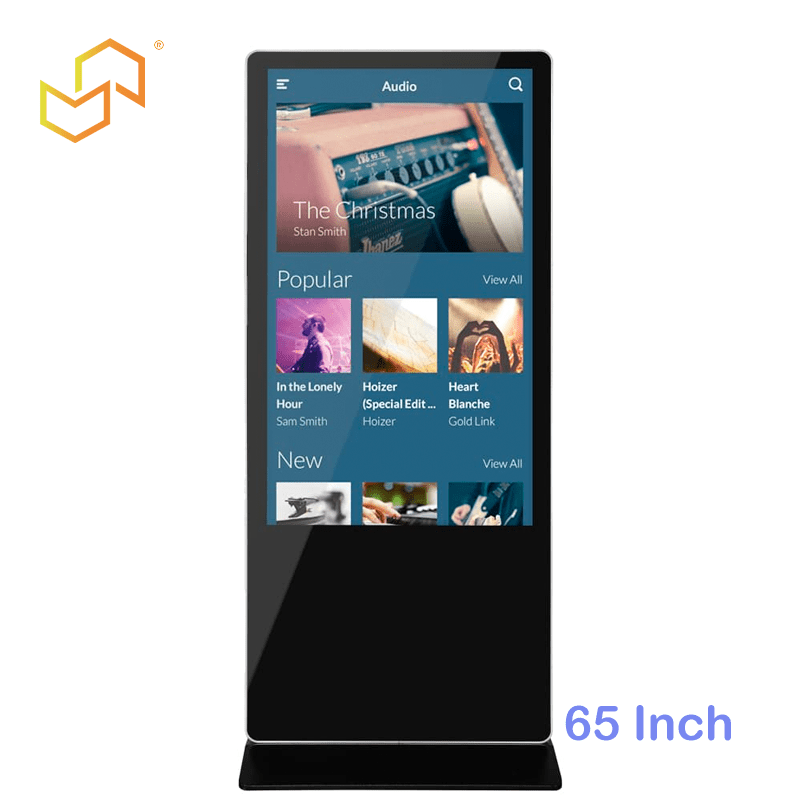
Freestanding 65-inch infrared touchscreen kiosk: aluminium body, tempered glass front, fanless cooling.
Checklist Item 1: Confirm You Actually Want Infrared Touch
The same cabinet size is offered with two touch technologies, and they fail in different ways. Get this wrong and no amount of negotiating will fix the deployment.
- Infrared (IR) builds a lattice of emitter and receiver beams in the bezel channel just inside a plain glass front. Nothing conductive is needed on the finger, so gloved hands and most opaque objects that break a beam will register. The trade-off is that grit, dust or insects collecting in the frame channel can interrupt a beam - a real consideration for a floor-standing unit near an entrance.
- Projected capacitive (PCAP) bonds a conductive sensor layer under the cover glass. The sealed surface wipes clean and has no beam to interrupt, but input depends on a finger or a compatible stylus, and glove thickness affects how well the controller tracks.
Neither technology is universally better: IR suits high-traffic self-service where input tolerance matters most, PCAP suits retail and hospitality where a smooth glass surface and easy cleaning matter more. If your project can go either way, compare the two 65-inch Windows models side by side rather than trusting a datasheet summary: the infrared version and the capacitive version. Note that our product pages do not record identical specification blocks for the two - the capacitive page documents an IP65 rating, while the infrared page leads with tempered glass and aluminium construction. Ask each vendor to state dust and water protection, glass hardness and touch-point count per model, not per family.
Checklist Item 2: Match the Panel Numbers to the Room
Do not accept "65 inch, Full HD" as a specification. Your checklist should require all seven of these values, and you should compare them only when every vendor answers with the same set:
- Native resolution. The 65-inch Windows models documented on our site run 1920 x 1080. If another supplier offers 3840 x 2160 at the same size, check what is driving it - a 4K panel paired with a low-power processor and a signage player that only decodes 1080p gives you pixels you cannot use.
- Brightness in cd/m2. The documented figure for these indoor models is 350 cd/m2. That suits normal interior lighting. A lobby with full-height glazing, or a kiosk sited near an entrance, needs a higher-nit panel and often an anti-glare treatment - raise this before the quotation, not after delivery.
- Panel type and viewing angle. IPS matters at 65 inches because two people stand side by side to interact. Ask for the panel type in writing.
- Contrast ratio and backlight life. Commercial panels in our range are commonly listed at 3000:1 contrast with a 50,000-hour backlight life; confirm both for the exact model you are quoting.
- Active area versus diagonal. Request the active display area in millimetres. Our 65-inch capacitive page records 1426.5 x 801.5 mm (H x V) and the Android 65-inch page records 1427.5 x 802.5 mm, so "65 inch" is a class label, not an exact panel. You need the real number to size your software layout and any bezel cutout.
- Aspect ratio and orientation. These models are 16:9 landscape. If your application needs portrait operation, confirm it before ordering - rotation affects mounting, cooling and the touch frame.
Checklist Item 3: Fix the Computing Platform Against Your Software
Windows is the reason most buyers choose this model line: kiosk software, .NET applications, peripheral drivers and existing back-office integrations usually land on Windows first. The infrared model's specification block lists an Intel Celeron J1900 quad-core at 2.0 GHz, 4 GB DDR3 and a 128 GB SSD running Windows 10; the capacitive 65-inch page names the same processor tier but does not state memory or storage in its spec block. Ask each vendor to confirm CPU, RAM and storage for the exact model they are quoting.
That is the right class of hardware for menu browsing, product look-up, wayfinding and form-based self-service. It is not the right class for heavy browser-based content, video walls or on-device analytics. Put your actual application in front of the supplier and ask them to confirm the CPU, RAM and storage tier against it. Two practical checklist questions:
- Which Windows edition and licence? Confirm whether the OS is licensed per unit and which edition ships, since a kiosk image you build on one edition should not be re-imaged later.
- Can you change the tier? Ask what CPU, RAM and SSD options exist at this cabinet size, and what changes in lead time and price when you move up. Some 65-inch Windows listings in the market pair a larger panel with a higher-tier processor; compare like for like.
If your deployment is signage plus simple touch rather than a full Windows application stack, ask for the Android alternative at the same size and price it honestly. The 65 Inch Commercial Android Kiosk uses a Rockchip RK3288 quad-core with 2 GB RAM and 8 GB storage on Android, which is usually cheaper to run for locked-down content playback.
Checklist Item 4: Enclosure, Cooling and Installation Method
The cabinet is where quotation differences hide. Specify all of the following:
- Construction. Aluminium body with tempered glass front on our documented models; ask others for material, glass thickness and surface treatment.
- Cooling. The documented 65-inch Windows models use a fanless design, which is what makes them usable in libraries, clinics and quiet lobbies. Confirm this, plus the operating temperature range and humidity range for the exact model quoted - our capacitive 65-inch page records -20 to 60 C operation and 5%-90% humidity.
- Footprint and height. Request overall height, width and depth. Our infrared 65-inch page records 2000 x 886.4 x 73.9 mm (H x W x D). Depth drives whether the unit clears an aisle; height drives sightlines and accessibility reach.
- Installation method. These units are documented as free-standing with alternative methods available. Decide early between freestanding, wall-anchored or recessed, because anchoring a two-metre interactive cabinet in a public space is a safety item, not a cosmetic one.
- Cable entry and power. Input is 100-240 V AC, 50/60 Hz. Confirm plug type for your country, cable exit position, and whether you need a lockable service door or an internal power strip for peripherals.
Checklist Item 5: Ports and Peripherals - the Part Most Buyers Forget
A kiosk is only as useful as what you can bolt onto it. The documented 65-inch Windows model provides RJ45 Ethernet, USB host ports and dual-antenna WiFi, which covers content updates and basic peripherals. Anything beyond that has to be agreed before production.
List the peripherals your application needs and ask the supplier to confirm driver support on the shipped Windows build:
- Thermal receipt printer
- Barcode or QR scanner
- Payment terminal or card reader
- Contactless ID or passport reader
- Camera for identity capture
- External speakers, headphone jack, or a hearing-assist loop
Then ask three questions in writing: how many USB ports are available inside the cabinet, is there mounting space and a power feed for each peripheral, and does the supplier test the integrated stack before shipping. For projects that need this level of integration, it is worth routing the enquiry through custom commercial display projects rather than ordering a standard cabinet and adding hardware on site.
Checklist Item 6: Branding, Software Lockdown and OEM Scope
Almost every real deployment differs from the catalogue unit. Decide now which of these you need, because each one changes tooling, minimum order quantity and lead time:
- Screen-printed or vinyl-wrapped side panels in your brand colours
- A logo area or lightbox on the header
- Custom colour for the cabinet, or a different bezel finish
- Windows locked to kiosk mode: taskbar hidden, boot-to-app, watchdog restart
- Pre-installed application and content schedule
- Your own label, serial numbering and packaging for resale
This is where a factory-direct relationship pays. ZCDISPLAY presents engineering-led OEM and ODM display manufacturing, covering the change from prototype through production, quality control and technical support. As a distributor or integrator, ask specifically whether your branding changes are cosmetic (wrap, print, label) or structural (housing, bezel, frame), since structural changes carry tooling cost and a longer first article.
Checklist Item 7: Quality, Compliance and Documentation
Do not accept "CE certified" as an answer. Your checklist should require:
- The certification marks actually held for this model, with the certificate scope - see our certificates page and confirm current validity for your shipment.
- What is inspected before packing: touch calibration, burn-in duration, port-by-port function test, dead-pixel policy.
- Packaging spec for a two-metre cabinet - flight case or plywood crate, corner protection, and how many units per container in your order quantity.
- A named contact for installation questions after the goods leave the factory.
Our quality control and warranty and support pages describe inspection and long-term technical support; treat the warranty length, spare-part availability window and advance-replacement terms as negotiable line items and get them on the proforma invoice.
Checklist Item 8: Commercial Terms You Must Nail Down Before Payment
| Item | What to require in writing |
|---|---|
| Unit price break | Price at your target quantity and at the next two quantity tiers, so you know what a re-order costs. |
| MOQ | Minimum order for the standard cabinet versus the OEM-branded version. |
| Lead time | For samples, for your first batch, and for repeat orders - stated separately. |
| Freight basis | Incoterms, port of loading, and whether the two-metre cabinet ships in a crate that fits your receiving dock. |
| Payment terms | Deposit, balance trigger, and inspection point before balance is released. |
| Spare parts | Touch frame, power supply and board as orderable spares, with prices. |
| Warranty | Duration, what voids it, and who pays return freight. |
A Ready-to-Send Inquiry Template
Send the same block to every shortlisted supplier. Comparable answers are worth more than a lower first number.
Project: indoor self-service / wayfinding / interactive catalogue, at [venue type], [country].
Model of interest: 65-inch freestanding Windows kiosk with infrared touch (capacitive alternative also requested).
Required from you: panel resolution, brightness, contrast, active display area in mm; CPU, RAM, SSD and Windows edition; touch-point count and glass hardness; dust/water rating for this exact model; overall H x W x D and weight; cooling type and operating temperature range; port list with USB count; supported peripherals and driver confirmation; branding options (cosmetic versus structural) with MOQ and tooling cost; certifications held for this model; sample lead time, batch lead time, price at [quantity] units with Incoterms; warranty terms and spare-part prices.
We will supply: application description, software stack, quantity, target delivery port, installation method.
Putting the Checklist to Work
Work through items 1 to 8 in order, then turn the answers into a single comparison sheet:
- Decide the touch technology against the people who will use the screen, not against the datasheet.
- Set the panel requirements against the light in the room and the viewing distance.
- Give your application description to each shortlisted supplier and let them propose the compute tier.
- Send the same inquiry block below to every supplier and collect answers in identical fields.
- Compare total landed cost - unit price, freight for a two-metre crate, spare parts and warranty risk - not the headline number.
When your specification is settled, send it to us through the contact form, or open a distribution conversation on the become a distributor page if you are stocking these cabinets for resale. Include venue type, quantity and installation method in the first message - that is what lets an engineer answer with a matching configuration instead of a catalogue PDF.
