374.78mmx70.86mm AA 14.9 Inch Gaming Slot Machine LCD Touch Screen Panel: How to Develop a Purchasing Checklist
A narrow bar-format touchscreen for a gaming cabinet looks simple on a datasheet and fails in the field for reasons that are almost never about resolution. Before you issue a purchase order, turn the specification into a set of questions your supplier can answer in writing. This checklist is built around the 374.78mmx70.86mm AA 14.9 Inch Gaming Slot Machine LCD Touch Screen Panel from ZCDISPLAY, a commercial display manufacturer in Shenzhen that supplies factory-direct hardware for cabinet builders, integrators and distributors.
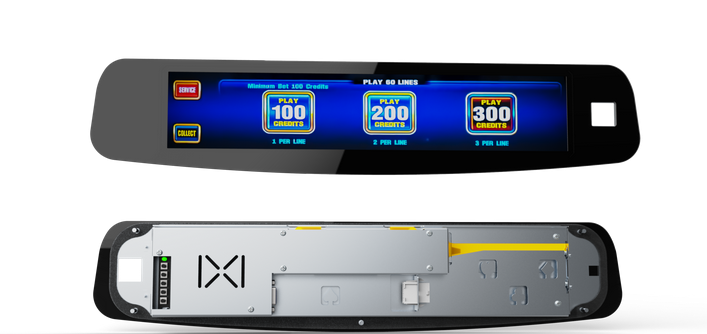
Bar-format 14.9 inch IPS touch panel for embedded and desk-mounted installation.
1. Confirm the active area, not just the diagonal
The model name carries the display area: an active area of 374.78 mm x 70.86 mm with a 1280 x 242 pixel resolution on an IPS LCD. A purchasing checklist starts by asking whether that rectangle fits your fascia opening, and it is worth checking both numbers rather than the "14.9 inch" label alone.
Two dimensions belong in separate rows of your worksheet:
- Active area — what the player sees and touches: 374.78 mm x 70.86 mm.
- Outer enclosure — what has to clear your cabinet cut-out, bezel and internal parts: 513.8 mm x 106.9 mm x 38.6 mm (V x H x D).
The difference between the two rows is the space your trim, gasket and mounting hardware must absorb. Because product pages in this family sometimes carry mixed size labels in the same specification block, do not machine to a web-page number: request the mechanical outline drawing and work from that before you cut a fascia.
2. Match brightness and contrast to the room, not the brochure
This panel is documented at 300 cd/m² with a 1000:1 contrast ratio, an 8 ms response time and a backlight life of 50,000 hours. That profile suits a cabinet indoors under controlled lighting. If your machine sits in a brightly lit arcade, near glazing, or under spotlights, ask the supplier which alternative you should move to — the 476.64mmx126.6mm AA 19.5 Inch Gaming Slot Machine LCD Touch Screen Panel in the same family is listed at 500 cd/m² with a 1920 x 510 resolution and a larger enclosure.
Write down the viewing distance, ambient light level and whether the panel faces a window. Those three facts decide brightness far more reliably than a headline number.
3. Decide who does the computing
The 14.9 inch panel is documented as a monitor solution with VGA/HDMI input, which means your game board or industrial PC drives the image. That choice affects cabling, power budget and service access, so put it in the checklist explicitly:
- Monitor configuration — you keep the existing game controller or single-board computer; only video and touch cabling change.
- Integrated computing — where the display must run its own applications, look at an industrial touchscreen panel PC such as the 19 Inch Industrial VESA-Mounted Embedded Panel PC, which ships with an Intel I3-3217U processor, 4GB DDR3 memory, a 128GB M.2 SSD and Windows 10.
If your cabinet already has a proven game platform, the monitor route is usually the lower-risk one: fewer drivers to validate and no new software stack to certify.
4. Specify the touch technology and how it will be touched
The 14.9 inch panel uses a projected capacitive touchscreen. In a gaming cabinet that matters for practical reasons: fingers do not need pressure the way they would with resistive film, and gloves or styluses behave differently from bare fingers.
Ask your supplier these questions in writing:
- Does the touch controller support multi-touch, and how many points?
- Which operating systems and drivers does the touch interface ship with?
- Can the panel be covered by additional glass or a protective overlay without losing touch response?
5. Verify installation method before ordering samples
The documented installation options for this model are embedded and desk-mounted. Embedded means the panel becomes part of your cabinet structure, so the outline drawing, bezel depth and 38.6 mm depth all have to work with your sheet metal or moulding. Desk-mounted suits evaluation benches and prototype builds where you do not want to commit a fascia design yet.
Order one desk-mounted sample before you tool any parts. Run it in the actual cabinet, at the actual viewing angle, with the actual lighting.
6. Check the environmental envelope against real duty
| Item | Documented value for the 14.9 inch panel | What to confirm for your deployment |
|---|---|---|
| Cooling | Fanless design for quiet operation | Airflow around the rear of the panel inside a closed cabinet |
| Operating temperature | -20 to 60 °C | Hottest internal temperature when the game board and lights are on |
| Storage temperature | -20 to 70 °C | Transit and warehouse conditions between factories and venues |
| Humidity | 5% to 90% | Coastal or unventilated venue humidity |
Fanless operation is an advantage in a noisy, dusty venue because there is no fan to fail or to pull debris inside. It also means heat has to leave through the enclosure, so ask where the manufacturer wants clearance around the back of the unit.
7. Plan content geometry for a stretched format
A 1280 x 242 canvas is not a scaled-down version of a normal screen. Your game studio needs artwork laid out for that aspect ratio, and the checklist should include an agreed test pattern or layout file so both sides confirm what will actually be rendered before production runs.
Useful items to lock down at sample stage:
- A layout mock-up drawn at 1280 x 242 with real fonts and button sizes.
- Where payline information, credit counters and promotional animation sit on the bar.
- Whether the same artwork has to work on a second size in your product line.
8. Treat the supplier relationship as part of the specification
Bar-format gaming panels are low-volume parts, so continuity of supply and engineering support matter as much as the datasheet. ZCDISPLAY presents factory-direct OEM and ODM manufacturing covering engineering, prototyping, production, quality control and technical support, which is the model most cabinet builders need when a display becomes part of a certified product rather than an accessory.
Put these in the checklist as deliverables from the supplier:
- A mechanical outline drawing with mounting hole positions and tolerances.
- The electrical interface list — VGA/HDMI input, touch interface, power input.
- A written statement of warranty scope, service process and spare-part availability for the project.
- Confirmation of which certifications apply to your destination market, verified against the supplier's certificate records.
9. Compare sizes inside the same family before you commit
| Attribute | 14.9 inch panel | 19.5 inch panel |
|---|---|---|
| Active area in model name | 374.78mmx70.86mm AA | 476.64mmx126.6mm AA |
| Resolution | 1280 x 242 | 1920 x 510 |
| Brightness | 300 cd/m² | 500 cd/m² |
| Contrast ratio | 1000:1 | 1000:1 |
| Response time | 8 ms | 8 ms |
| Backlight life | 50,000 hours | 50,000 hours |
| Enclosure size (V x H x D) | 513.8 x 106.9 x 38.6 mm | 601.7 x 206.4 x 46.2 mm |
| Touch technology | Projected capacitive | Projected capacitive |
| Installation | Embedded, desk-mounted | Embedded, desk-mounted |
| Cooling / operating range | Fanless; -20 to 60 °C | Fanless; -20 to 60 °C |
Both entries in this family are listed as monitor solutions with VGA/HDMI input and the same temperature and humidity envelope, so the decision usually comes down to cabinet width, brightness requirement and how much content you want visible at once.
10. Write the inquiry so it can be quoted without guesswork
A well-built checklist turns into a short, precise request. Send the application, the cabinet opening dimensions, your choice of monitor or integrated computing, the touch requirement, the operating environment and the quantities for samples and first production. That is also how you get comparable quotations from commercial display suppliers, because every quotation then answers the same question.
Talk to ZCDISPLAY about bar-format gaming panels, request the outline drawing for the 14.9 inch model, or ask about OEM and ODM display manufacturing if the panel needs to match your own enclosure design. Cabinet builders sourcing several sizes can also review the distributor program.
