How to Source 1200mm Retail Shelf Edge Digital Pricing Display: Display Procurement for Equipment Integration
A one-metre shelf-edge screen is not a single SKU you can drop into a purchase order. On our site the 1200 mm class is covered by several product pages, each with a different panel format, on-board computer and mounting logic, and the specification tables do not agree with each other on every figure. This guide walks procurement teams, system integrators and equipment builders through how to read those listings, what to confirm with the factory before issuing a purchase order, and which details decide whether the hardware integrates cleanly into gondola shelving or a custom enclosure.
Start With the Function: Price Label Replacement or Continuous Promotional Bar
The first decision is not size but role. A 1200mm Retail Shelf Edge Digital Pricing Display is built to replace printed price labels: it carries item price, product image and short video at the shelf edge, and the factory listing describes batch price adjustment with content refreshed in seconds, online marketing with data synchronisation, and mobile management. The panel is very narrow relative to its length, so the layout is one long strip of price cells rather than a poster.
A 1200mm Commercial Shelf Screen Display sits in the ultra-wide stretched bar family instead. It is a promotional and information strip for continuous shelf-edge coverage, with a taller panel, CMS-driven content and remote management across stores. Content design here looks closer to signage than to a price list. If your project needs SKU-level pricing tied to a POS or ERP feed, buy the pricing display. If it needs aisle-wide brand messaging, motion content or wayfinding, buy the stretched bar.
Practical rule: write down whether each shelf line must show an individually addressable price per SKU. If yes, everything downstream — resolution, CMS/DPS software, API scope, mounting depth — is decided by that requirement.
How the 1200 mm Listings Differ on Panel and Computer
Panel geometry drives legibility. The pricing display listing states an active area of 1196.16 x 49.84 mm with a 3840 x 160 resolution, which gives you enough vertical pixel count for price plus product image in one narrow cell. The stretched bar listing describes the same length class as a 47-inch-class ultra-wide panel with a Full HD-class custom aspect ratio and 400 to 500 nits of brightness for aisle lighting.
| Item to confirm | Pricing display listing | Stretched bar listing |
|---|---|---|
| Role at the shelf | Digital price label replacement, price plus image and video | Continuous promotional and information strip across the aisle |
| Panel length class | 1200 mm (active area stated as 1196.16 x 49.84 mm) | 1200 mm ultra-wide stretched LCD, 47-inch class |
| Resolution | Stated as 3840 x 160 | Described as Full HD-class ultra-wide with a custom aspect ratio; confirm the exact pixel count per batch |
| Brightness | Stated as 500 cd/m2 | Given as a range, 400 to 500 nits |
| On-board computer | Android board listed; Android version and processor differ between pages, so confirm the shipped firmware version | Quad-core Android board, Android 10 to 11 class, with CMS compatibility and open APIs |
| Housing | Metal housing, colour customisable, base and bracket included | Slim aluminium housing, shelf brackets and VESA mounts, hidden cabling |
| Content management | CMS/DPS listed as optional; confirm licence scope and update workflow | Android CMS with remote cloud management, scheduling and device monitoring |
Note the discrepancies honestly rather than assuming a single datasheet. The pricing display page carries model code SH4708AD in its specification block while the same table format appears on other shelf-edge listings with different codes; the Android version and memory entries are also inconsistent across pages. Treat those fields as batch-dependent and have the factory confirm them in writing against your order quantity.
Integration Details That Decide Whether the Hardware Fits
Mechanical fit and load path
- Total unit depth matters more than panel length. The pricing display listing gives a single-unit outer size of 1214.8 x 68.8 x 25 mm, so the strip projects only about 25 mm from the shelf edge — workable on standard gondola rails but worth checking against product that overhangs the shelf lip.
- Confirm bracket type and fixing method for your specific shelving rail profile before ordering samples. The listing includes a base and bracket, but not every rail system accepts the same clip.
- For equipment integration rather than store shelving, plan on VESA or custom brackets and route power through the enclosure; the stretched bar family supports both approaches.
Power and cabling
- The pricing display runs on DC 12 V with a Type-C power input, listed consumption of 35 W and standby under 1 W. Budget the PSU count per shelf run and confirm cable length per unit.
- Ports listed are two micro USB (OTG), one SD card slot and the Type-C power connector. If your deployment needs wired Ethernet for a store network, raise that early — it changes which board variant you receive.
- The stretched bar family lists WiFi, LAN, USB and HDMI in/out plus PoE or DC power options on some configurations, which is usually what integrators want for multi-unit runs.
Environment rating
- Operating temperature ranges differ between listings: 0 to 50 degrees C on the pricing display table and minus 20 to 60 degrees C on other shelf-edge pages. Cold-aisle, chilled-section or semi-outdoor placement needs a written confirmation of the tested range for your batch.
- Humidity tolerance is listed as 20 to 85 percent on the pricing display page and wider elsewhere. Match it to the actual store zone, not to the category name.
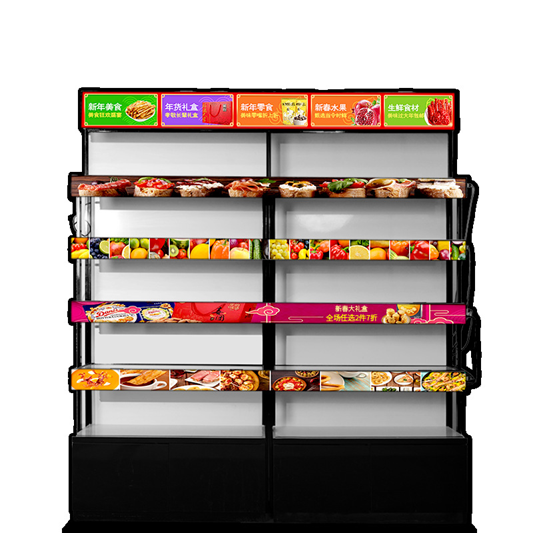
Digital pricing strip replacing printed labels on a gondola shelf edge.
Software, APIs and the Questions to Put to the Factory
Hardware is only half of a shelf-edge project. Ask which content platform manages the units, whether pricing data syncs from your POS or ERP through an API, and what happens when a unit goes offline. The stretched bar listing documents open APIs, custom APK support and cloud management with scheduling and device monitoring across sites; the pricing display listing marks CMS/DPS as optional, so licensing scope must be pinned down in the quotation.
Send these items with your enquiry:
1. Application and store format, including whether price data is centrally managed.
2. Shelf rail profile, required unit length and allowed projection depth.
3. Power method: local DC adapters, shared supply or PoE where offered.
4. Network method: WiFi only or wired LAN per shelf run.
5. Content scope: price cells only, or price plus promotional media.
6. Integration interface: CMS platform in use, POS or ERP middleware, custom APK needs.
7. Order quantity, target ship window and destination port for landed-cost calculation.
Commercial Terms and Supplier Vetting
ZCDISPLAY is a commercial display manufacturer in Shenzhen supplying factory-direct hardware for distributors, integrators and OEM projects. For this product family the listing states silk-printed logo on the housing with an MOQ of 200 pieces at no extra charge, mass-order lead time of 7 to 10 days depending on quantity, samples in about one day from stock or 7 to 10 days for a custom design, and a one-year quality guarantee covering hardware failure with replacement shipment covered. Extended warranty terms are offered on some shelf-screen configurations. Verify current pricing, MOQ, lead time and certification scope against your order before signing, since these terms move with volume and configuration.
Quality control is run in-house from incoming material through finished goods, and third-party inspection arranged by the buyer is accepted — useful for integrators who need pre-shipment sign-off before units go to store fit-out teams. For custom requirements such as housing colour, firmware preload or a different mounting interface, use the OEM / ODM route; that is also where certification support for target markets is handled.
Related Sizes and Complementary Hardware
Most deployments mix lengths rather than standardising on one. The 600mm Retail Shelf Edge Digital Pricing Display suits shorter bays and single-SKU positions, while the 900 mm shelf screen covers mid-length runs. For wider interactive shelf projects, the Commercial Shelf Edge LCD Series in 23.1, 35 and 47.1 inch is documented as a unified series sharing one CMS platform, API set and mounting system, which keeps mixed-length store rollouts manageable from a single dashboard.
Where the display itself has no on-board computing, or where you want one controller per shelf run instead of one per strip, pair the panel with an Android digital signage media player from the mini PC range. The same engineering team supports custom commercial display projects, so enclosure fit, cable routing and bracket geometry can be developed together with the panel instead of being solved on site.
Common Sourcing Questions for This Format
Can one store mix 600 mm, 900 mm and 1200 mm units on the same fixture?
Yes, provided the power method and content platform are the same across lengths. The shelf-edge series documentation describes a shared CMS, API set and mounting system for mixed lengths, which is what makes a phased rollout practical: shorter bays get 600 mm strips, premium end-caps get longer runs, all managed from one dashboard.
What typically has to be customised for an equipment-integration order?
Bracket geometry, housing colour, cable exit position and pre-loaded firmware are the usual changes. Housing colour is listed as customisable on the pricing display, and logo silk-printing is available at 200 pieces. Anything that alters the enclosure or board layout goes through the engineering-led OEM route so tooling and certification scope are agreed before production.
Why do two listings for the same length class show different Android versions?
Because the shelf-edge range has been built on more than one board generation, and older pages still carry earlier board entries. That is exactly why the purchase order should name the board and firmware version rather than the marketing title. Ask for a specification sheet tied to your order quantity and confirm it against the sample you approve.
A Short Procurement Sequence That Avoids Rework
- Step 1 — Fix the role. Price replacement or promotional bar. Everything else follows.
- Step 2 — Measure the shelf. Rail profile, bay length, allowed projection depth, cable path.
- Step 3 — Lock the specification in writing. Panel length and resolution, brightness, board and Android version, power input type, network method, tested temperature range for your zone.
- Step 4 — Test one sample per configuration. Mount it on real racking, push a price update through the CMS, and check legibility under your store lighting before approving volume.
- Step 5 — Confirm commercial terms last. Logo option, MOQ, lead time, warranty scope, inspection method, shipping terms.
Get a Configuration Checked Before You Order
Send the shelf measurements, network constraints and content requirements for your rollout and we will confirm which 1200 mm configuration fits — pricing display or stretched bar, which board and firmware version, and what needs customising. Start from the product page or the contact form, and distributors can register through the distributor programme for stocking terms.
