600mm Retail Shelf Edge Digital Pricing Display: A Practical Guide for Project Procurement
A shelf edge digital pricing display sits on the front rail of a supermarket gondola, in the shopper's line of sight, and replaces printed paper labels with a narrow bar-format screen. The 600mm size is the one that matches a standard bay width, so it is usually the first model an integrator specifies when a client wants to trial electronic shelf labels without re-shelving the store. This guide covers what the format actually does, which specifications matter at quotation stage, and how to structure an inquiry so a manufacturer returns a comparable offer rather than a generic catalogue sheet.
What a 600mm Shelf Edge Display Is For
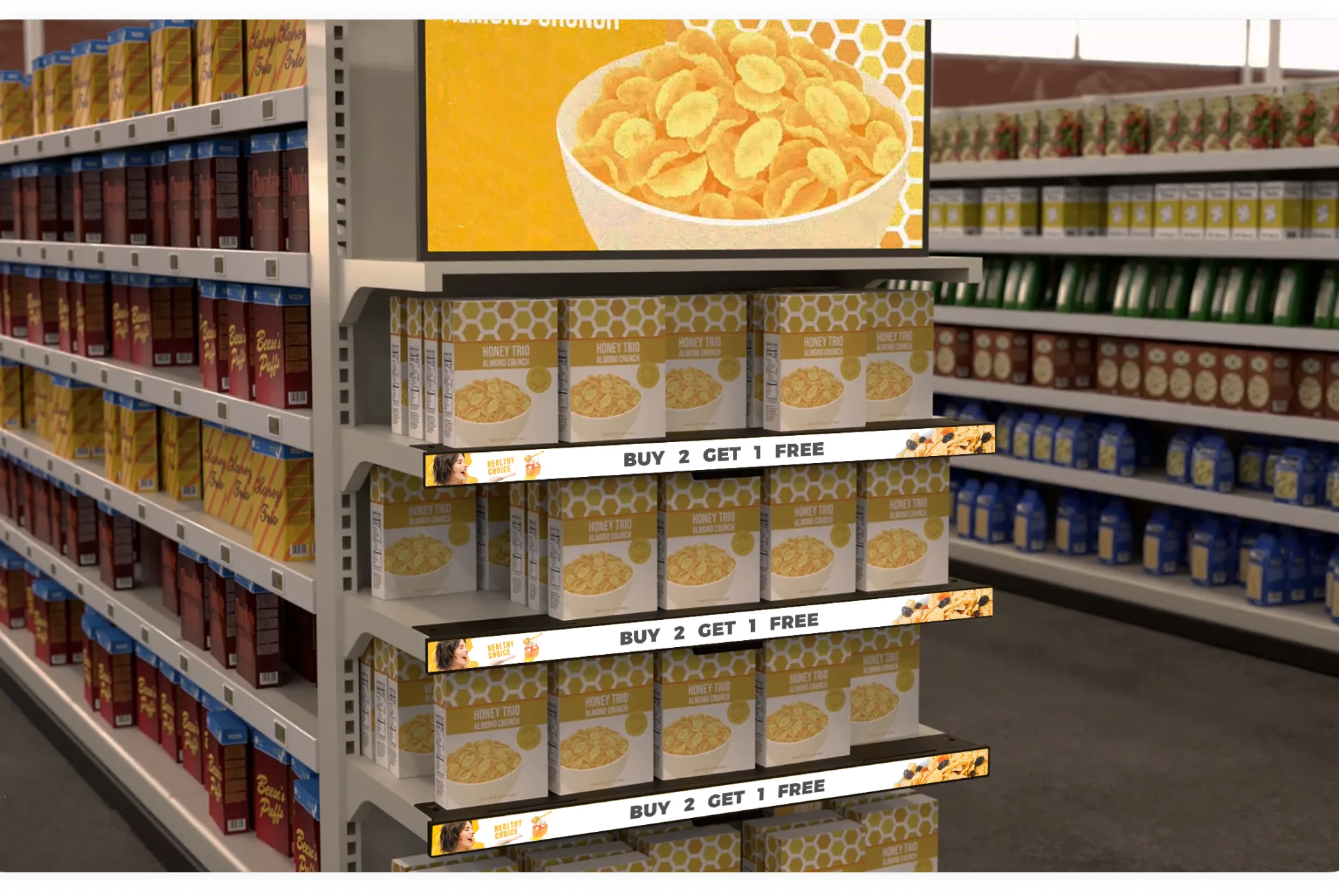
Retail shelf edge screens solve a narrow, unglamorous problem: price and promotion information goes stale faster than store staff can reprint it. Digital pricing displays update price, product image and short video from a central system, so a price change that once meant printing, cutting and slotting paper cards becomes a batch operation pushed over the network. The product description for the 600mm Retail Shelf Edge Digital Pricing Display states this directly: pricing, item image and video updated in seconds, replacing traditional paper price labels, with batch price adjustment, online marketing with data synchronisation, and mobile management.
Two roles follow from that. The first is label replacement - the screen occupies the label rail and shows price plus product detail for the facing above it. The second is shelf-level media - a thin strip of moving content at eye height, where a promotional message competes with the shopper's decision rather than with a ceiling-mounted screen. A project usually starts with one of these briefs and quietly needs both, so state which one dominates before asking for a configuration.
Format Options: 600mm Bar Versus Shelf Edge Android Screens
"Shelf edge display" covers two different hardware families, and mixing them up is the most common procurement error. The pricing bar family is short in height - around 50mm of active area - and long horizontally, designed to sit inside or on the label rail. ZCDISPLAY documents this family in three lengths: 600mm, 900mm and 1200mm. The larger 1200mm Commercial Shelf Screen Display is an ultra-wide stretched LCD bar for the same retail integration brief at gondola scale.
The second family is taller: the 23.1 Inch Shelf Edge Android Screen and similar 35 inch or 47 inch shelf edge models read as signage strips mounted along a shelf face or aisle end. They carry richer creative content but do not behave like a price label. If the requirement is "price per SKU, updated centrally", specify the bar format; if it is "category message along the shelf", specify the taller strip.
Specifications to Confirm on the Quotation
For a 600mm-class pricing bar, ZCDISPLAY's documented model SH2408AD carries the following figures. Treat them as the reference point for one specific model, and ask the supplier to confirm the numbers for the exact build you are ordering - dimensions in particular, because the active display area and the housing footprint differ.
| Item | Documented value (SH2408AD) | Why it matters in a project |
|---|---|---|
| Active display area | 585 x 48 mm; single unit size 597.2 x 61.8 x 15 mm | Determines whether the bar fits your label rail and bay width without overhang. |
| Resolution | 1920 x 158 | Sets how many SKU zones fit on one bar and how legible price text is at shelf distance. |
| Brightness | 400 cd/m2 | Adequate for indoor aisle lighting; compare against your own lux measurement before assuming it is enough near entrances or skylights. |
| Viewing angle / contrast | 85/85/85/85 (L/R/U/D), 1000:1 | Shoppers approach the rail at an angle; off-axis washout is the failure mode to test in a sample. |
| Platform | Android 8.1, Cortex-A35, Wi-Fi | Determines whether your own app or CMS can run on it, and whether pre-loading is possible. |
| Ports | 2 x micro USB (OTG), 1 x SD card, 1 x Type-C (DC 12V) | Affects service access and how the power run is planned along the gondola. |
| Power | DC 12V, 17W running, under 1W standby | Multiplies across hundreds of units - an input to store electrical load and any energy-efficiency brief from the client. |
| Environment | 0 to 50 C, 20% to 85% humidity | Covers conditioned retail space; chilled and frozen zones need a different discussion with engineering. |
| Housing | Metal, black, customisable colour; base included; power cable and bracket supplied | Finish and mounting hardware decide whether the bar looks like store furniture or an add-on. |
| CMS / DPS | Optional | Decide early whether you supply the pricing software or buy the display with a digital pricing system attached. |
Figures above are quoted from the product page for one model at the time of writing. Confirm them, together with price, minimum order quantity and lead time, in writing against your own configuration before you commit to a rollout quantity.
Integration: What Sits Behind the Screen
The display is the visible part of a system. Three layers decide whether a rollout works at store level:
- Network. The documented model connects over Wi-Fi. Before ordering, check signal strength along the aisle and behind metal gondolas - a shelf edge bar that drops off the network silently shows yesterday's price, which is worse than paper.
- Content and pricing system. CMS/DPS is listed as optional. If your client already runs an ERP or pricing engine, ask what interface the display side expects and whether mapping SKU codes to screen zones is done by the supplier or by your own integrator team.
- Power along the rail. Each unit takes DC 12V through Type-C. Cable routing, trunking and how many bars share one supply are store-fitout questions; settle them with the electrical contractor during survey, not at installation.
Procurement Checklist for Project Buyers
Distributors, system integrators and retail project buyers evaluating ultra-wide stretched LCD displays get sharper quotes when the inquiry itself is structured. Send the following with your request:
- Bay width and rail type, with a photo or drawing of the shelf edge you are fitting into.
- Units per store, number of stores, and whether this is a pilot bay or a full rollout.
- Whether you need the pricing software (DPS/CMS) or only hardware with Android.
- Operating environment: air-conditioned hall, near entrance, chilled fixture - state it explicitly.
- Branding requirements. The supplier's published FAQ states that silk-printing a logo on the case is available, with a minimum order quantity of 200 pieces and no extra charge for that work; opening logos are treated separately.
- Service expectations. The published terms describe a one-year quality guarantee from purchase date, excluding human damage and force majeure, with replacement handling agreed after confirmation - verify current wording for your order.
For custom housing, non-standard length or pre-loaded applications, go through OEM / ODM display manufacturing, where ZCDISPLAY describes engineering-led work from prototype through production and quality control. Buyers sourcing multiple display types for one store programme - shelf edge bars alongside wall-mounted screens and kiosks - can review the wider wholesale commercial displays range in the same enquiry, since a single supplier handling several formats simplifies spares and service.
Pilot Before Rollout: A Realistic Sequence
A pilot that tests the right things takes weeks, not months. Sample units arrive quickly when stock exists; custom designs take longer, and mass orders are documented at 7 to 10 days depending on quantity - so build the schedule around confirmed dates rather than averages.
- Install one bay with sample bars and run it in parallel with paper labels for a full promotional cycle, including a mid-week price change.
- Check legibility at three positions: straight on, from an angle down the aisle, and under the store's own lighting measured with a light meter.
- Verify network stability behind the gondola over two weeks, logging any dropouts.
- Time the batch price update end to end, from the pricing system to the shopper-facing screen.
- Record installation labour per bay so rollout cost per store includes fitout, not just hardware.
Only after those five results exist does a store-by-store quantity become defensible. Buyers who skip the pilot tend to discover the electrical and network constraints after ordering hundreds of units.
Prepare your enquiry. Send shelf dimensions, store count, environment and software scope, and ZCDISPLAY's engineering team can match the bar format, mounting and configuration to the project. Start at the contact form, or see the product page for the 600mm Retail Shelf Edge Digital Pricing Display.
Distributors and integrators building a recurring retail business should review the digital signage distributor program before placing a first order.
